
To get reliable results from AI, PMO and project professionals should build each prompt with P.R.O.M.P.T. and test every output with T.R.A.C.E. before using it. P.R.O.M.P.T. stands for Purpose, Relevant context, Objective output, Material, Parameters, and Test and tune. T.R.A.C.E. stands for Traceable, Relevant, Accurate, Complete & clear, and Explicit uncertainty. This guide, from Wellingtone’s October 2026 masterclass, shows how both work using a real Steering Committee example.
Key Takeaways: How to Write and Test AI Prompts
Scroll to the bottom to download your FREE practice toolkit
- “AI cannot do it” usually means the task, the evidence or the quality test has not been defined.
- Build every important prompt with P.R.O.M.P.T.: Purpose, Relevant context, Objective output, Material, Parameters, Test and tune.
- Test the response with R.A.C.E.: Traceable, Relevant, Accurate, Complete & clear, Explicit uncertainty. If it is not traceable or not accurate, it is not ready, however polished it sounds.
- Improve one element at a time: Define, Build, Test, Tune.
- Set tone for how a report reads, never to change what it says. “Keep it positive” is how watermelon reports are made.
- Save prompts that work, so good practice becomes repeatable.
Most PMO and project professionals have now tried AI. Fewer get outputs they would confidently put in front of a Steering Committee. This masterclass focused on closing that gap: how to write a prompt that produces something you can check, challenge and defend.
The Mentimeter poll at the start set the scene. Most attendees described themselves as emerging users, actively trying to use AI for work, with few yet calling themselves power users. That is the point where technique starts to matter more than access.
One reminder before you start: treat anything you paste into a free AI tool like a public email. Use fictional or anonymised material, or an approved enterprise tool. Our guide to getting started with AI in your PMO covers what is safe to share.
Why “AI Can’t Do It” Usually Means the Prompt Wasn’t Defined
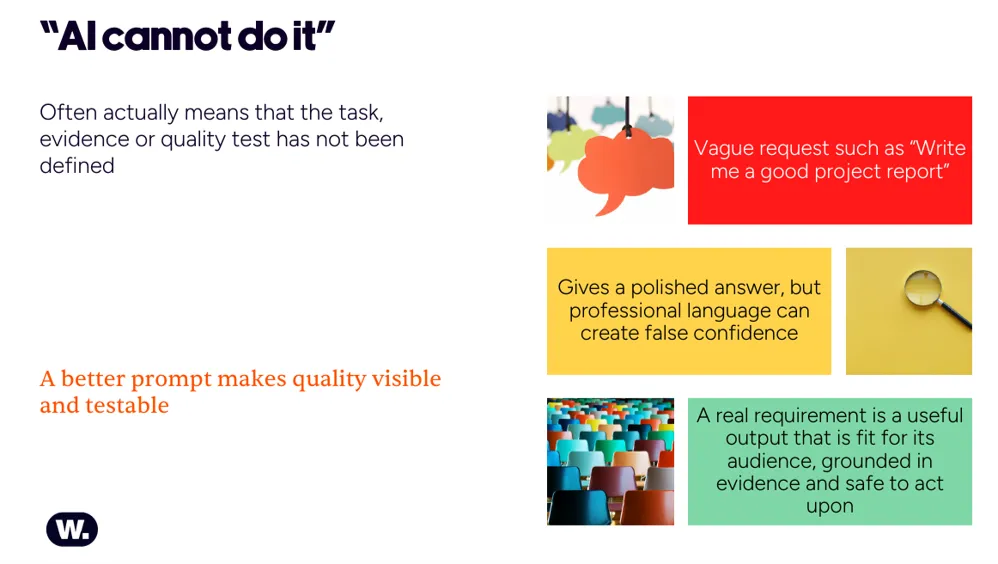
One of the most common things we hear is “I tried it, but AI can’t do it.” More often, the task, the evidence or the quality test was never defined.
A vague request such as “write me a good project report” will still produce a polished answer. The problem is that professional-sounding language creates false confidence. Busy people are less likely to check something that already reads well.
The real requirement is an output that is fit for its audience, grounded in evidence and safe to act on. A better prompt makes that quality visible and testable.
Before and After: Small Changes That Make an AI Prompt Easier to Trust
|
Before |
Column 3 | |
|---|---|---|
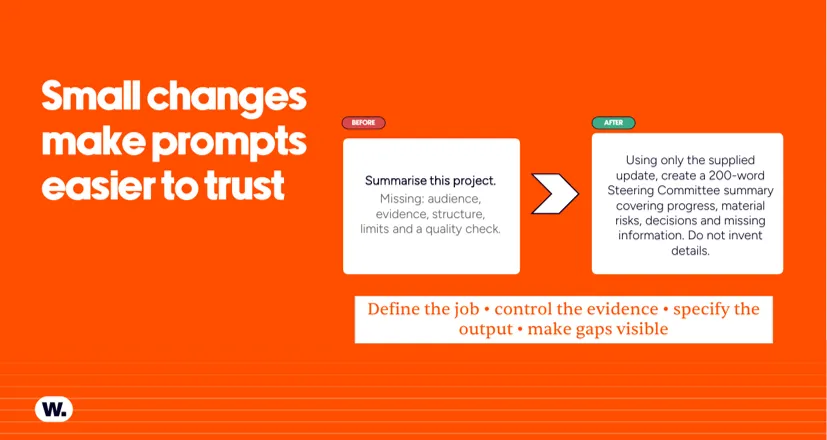
| The prompt | “Summarise this project.” |
“Using only the supplied update, create a 200-word Steering Committee summary covering progress, material risks, decisions and missing information. Do not invent details.” |
| What the AI is told |
Nothing about who it is for, what evidence to use, what to include, how long it should be, or how to handle gaps. |
The audience (Steering Committee), the evidence (only the supplied update), the content and length (200 words on progress, risks, decisions and gaps), and a limit (do not invent details). |
How to Build an AI Prompt with P.R.O.M.P.T.
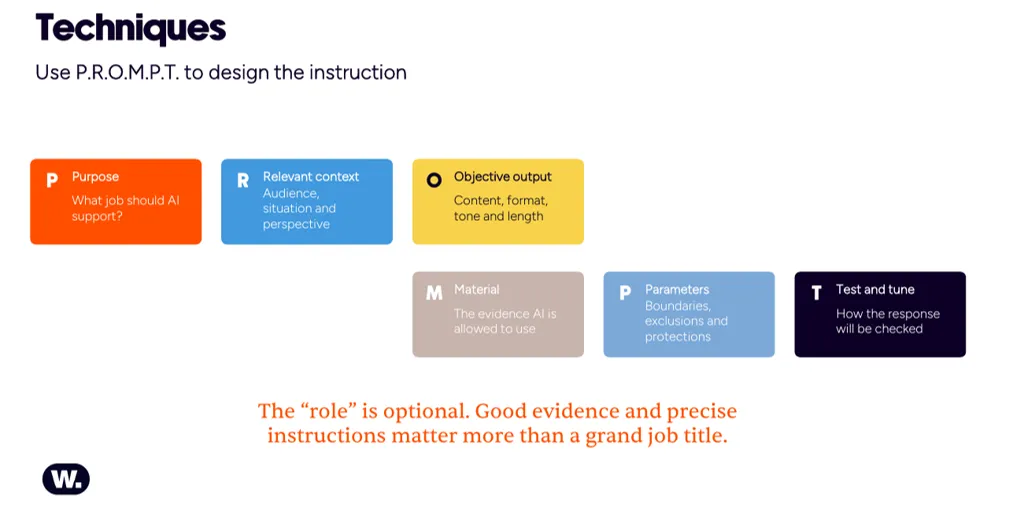
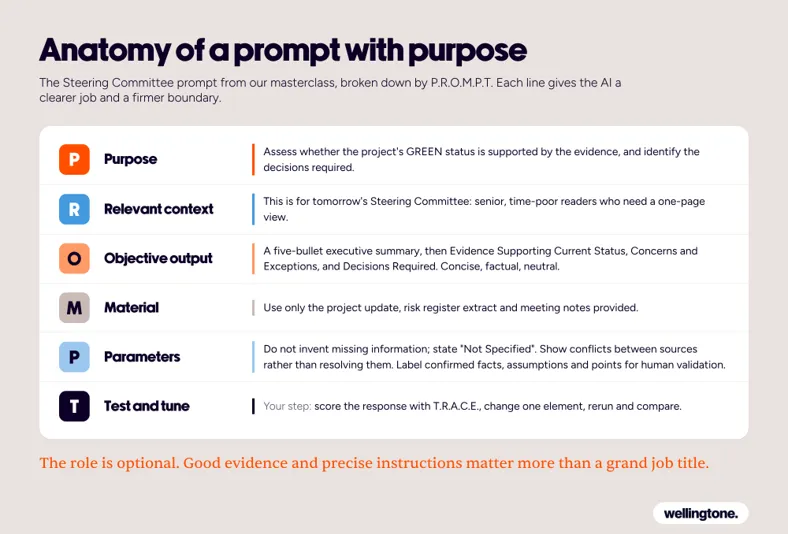
P.R.O.M.P.T. is a simple checklist for designing an instruction. It is not about magic words. It gives the AI a clearer job and firmer boundaries.
Good prompting is not about finding magic words. It’s about defining the outcome, providing the right evidence, setting clear boundaries and challenging your results.
Emma Arnaz-Pemberton, Director of Consulting Services, Wellingtone
| Letter | Element | Question to answer | In practice |
|---|---|---|---|
| P | Purpose | What job should AI support? | Name the decision or activity the output is for. |
| R | Relevant context | Who is the audience, what is the situation and from what perspective? | “For tomorrow’s Steering Committee, who are senior and time-poor.” |
| O | Objective output | What content, format, tone and length? | “Five bullets, then a table, under 200 words, neutral tone.” |
| M | Material | What evidence is AI allowed to use? | “Use only the attached update, risk register extract and meeting notes.” |
| P | Parameters | What are the boundaries, exclusions and protections? | “Do not invent missing information. Show conflicts rather than resolving them.” |
| T | Test and tune | How will the response be checked? | Score it with T.R.A.C.E. (below), then refine one element and rerun |
A role (“act as a PMO manager”) is optional. Good evidence and precise instructions matter more than a grand job title, although a role can help when you need a particular perspective or message.
Worked Example: Turning a Weak Steering Committee Prompt into a Reliable One
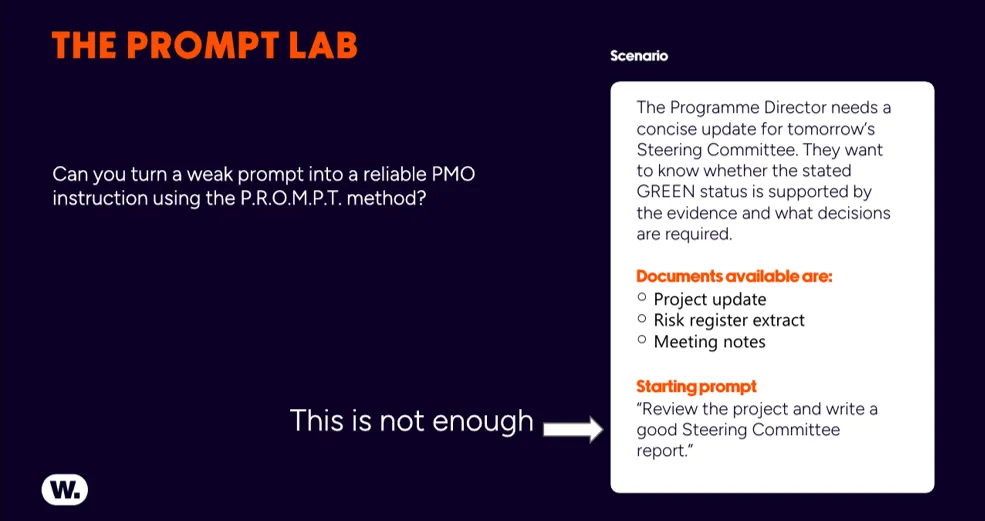
Attendees were given a realistic scenario. The Programme Director needs a concise update for tomorrow’s Steering Committee. They want to know whether the stated GREEN status is supported by the evidence, and what decisions are required. Three documents are available: a project update, a risk register extract and meeting notes.
The starting prompt was: “Review the project and write a good Steering Committee report.”
The community’s improvements, submitted live through Mentimeter, already covered most of P.R.O.M.P.T.:
- Name the audience and their level, because a Steering Committee needs different detail from a project team.
- Keep it short: under 200 words, or six or seven points, because senior readers want a one-pager.
- Name the files to review and cite the source for each point.
- Avoid the word “good”, because it is too subjective to test.
- Do not guess, be factual, avoid jargon.
- Ask for the path to green, not just the current status.
Here is the model answer we shared. You can copy it and adapt it:
Using only the project update, risk register extract and meeting notes provided:
1. Assess whether the current Green RAG status is supported by the evidence.
2. Produce a five-bullet executive summary.
3. Highlight significant risks, issues and dependencies.
4. Identify any inconsistencies, missing information or assumptions.
5. Summarise decisions required from the Steering Committee.
Present your findings as:
– Executive Summary
– Evidence Supporting Current Status
– Concerns and Exceptions
– Decisions Required
Do not invent missing information.
If information is unavailable, state “Not Specified”.
Where sources conflict, identify the conflict rather than resolving it.
Distinguish between:
– Confirmed facts
– Assumptions
– AI observations that require human validation
The goal isn’t about having the perfect answer. The goal is to create outputs that can be trusted, verified and improved.
Emma Arnaz-Pemberton, Director of Consulting Services, Wellingtone
Try It Yourself: What a Well-Grounded AI Response Should Flag
Run the model prompt against the fictitious Warp Core Group files in the free toolkit. A well-grounded response should flag concerns like these, each traced to a named source. The full worked example, including the executive summary and decisions required, is in the toolkit slides.
| Concern or exception | Evidence |
|---|---|
| Milestone date inconsistency | Project update and meeting notes show different dates |
| Key action has no owner | Meeting notes |
| Delivery dependency not fully resolved | Risk register |
| Progress reported as “nearly complete” with no supporting measure | Project update |
Your output will be worded differently. What matters is that every point traces back to a named source and the gaps are visible.
How to Test AI Outputs with T.R.A.C.E.
A structured prompt is only half the job. T.R.A.C.E. lets you judge the response objectively, rather than on whether it sounds polished or “sounds like me”. Score each criterion 0 (failed), 1 (partly met) or 2 (clearly met).
| Letter | Criterion | Question to ask |
|---|---|---|
| T | Traceable | Can each important claim be linked to the supplied evidence? |
| R | Relevant | Does it answer the business need for the intended audience? |
| A | Accurate | Are dates, figures, status and terminology represented correctly? |
| C | Complete and clear | Has it covered the request and made missing information visible? |
| E | Explicit uncertainty | Are assumptions and human validation points clearly labelled? |
How to Score AI Outputs: TRACE Scores, RAG Ratings and the Critical Fail Rule
| TRACE Score | Interpretation | Action | RAG | Assurance View |
|---|---|---|---|---|
| 9 – 10 | Excellent | Safe to use with normal human review | Green (8–10): the prompt is working; refine only for efficiency or format | Sufficient confidence to use |
| 7 – 8 | Good | Use, but make minor edits to the prompt or output | Green at 8; Amber at 7 | Sufficient confidence at 8; additional assurance required at 7 |
| 5 – 6 | Borderline | Needs improvement before relying on it | Amber (5–7): useful, but important controls are missing; refine and rerun | Additional assurance required |
| 0 – 4 | Poor | Rewrite the prompt and try again | Red (0–4): fundamentally flawed; redesign before using the output | Insufficient evidence to support use |
The Critical Fail rule. If Traceable or Accurate scores 0, the output is automatically Amber or Red, regardless of the overall score. If it is not traceable, it cannot be trusted. If it is not accurate, stop and rework it. Accuracy can also fail on sources: an external tool may draw on information that does not apply to your country, sector or organisation.
For PMO and assurance professionals, the assurance column is the useful link. AI outputs should be evaluated like any other evidence source, with confidence earned rather than assumed.
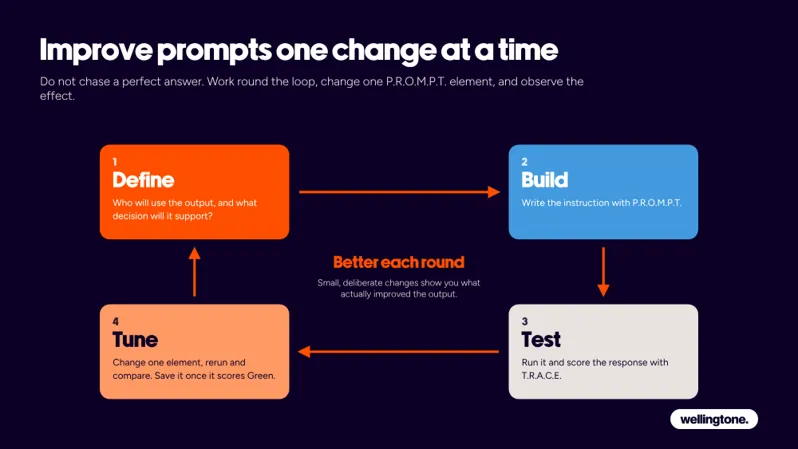
A Four-Step Process for Better AI Prompts: Define, Build, Test, Tune
Do not chase a perfect answer. Make one improvement at a time and observe the effect.
- Who will use the output, and what decision will it support?
- Rewrite the weak prompt using P.R.O.M.P.T.
- Run it and score the response using T.R.A.C.E.
- Change one prompt element, rerun and compare.
| Trap | What to do |
|---|---|
| Conflicting dates | Ask AI to show the conflict, not silently resolve it. |
| Unsupported status | Require evidence for any RAG or confidence statement. |
| Missing owner | Label it “Not specified”; do not let AI invent accountability. |
| Ambiguous progress | Challenge words such as “nearly” or “on track”. |
| Fact vs recommendation | Separate source facts from AI-generated options. |
| Sensitive information | Use approved tools and minimise unnecessary data. |
How to Stop AI Creating Watermelon Reports
Ask AI to “keep it positive” and you can get a watermelon report: green on the surface, red underneath.
Imagine a project that is behind schedule, over budget and short of the resource it needs to finish. If you ask AI to sugar-coat that, readers may not grasp that the project is heading for failure.
Ask it to be factual, ask it to be concise, not to invent things, and ask it to maintain a neutral tone. That would be my big takeaway from today.
Baz Khinda, Commercial Director, Wellingtone
| Avoid: instructions that spin the truth | Better: tone for delivery, not spin |
|---|---|
| “Keep it positive” or “upbeat” | “Be clear, not comforting” |
| “Reassure the Board” | Concise, factual, professional |
| “Sugar-coat the slippage” | State risks and gaps plainly |
| “Make it sound on track” | Surface bad news early |
Set tone for how a report reads, never to change what it says. Tone never overrides Accurate or Traceable: a green-sounding report still has to be a green one.
Why Human Judgement Still Matters When You Use AI
Projects are delivered by people, not models. AI can give you the skeleton of a report or a first draft, but the context, judgement and accountability that make it useful can only come from you.
- Add your context: the project reality, history and nuance the AI never had.
- Apply your judgement: cut what is wrong and shape it for your audience.
- Own your name: you are accountable for what goes out. “The AI said so” is never an answer.
Use AI to give you the skeleton of a report, but projects are delivered by humans. Whatever you’re sending out, it’s your credibility on the line, not the AI’s.
Baz Khinda, Commercial Director, Wellingtone
You can ask AI to check its own output against T.R.A.C.E., and that can help. But it is still marking its own homework, so a human review remains essential.
Before using any AI output, ask four questions:
- What evidence supports this?
- What assumptions has AI made?
- What should a human verify?
- What decision could be affected by an error?
If you cannot explain why the answer is reliable enough for its intended use, it is not ready to send.
“A response to a wrong decision can never be ‘well, the AI said this’. It’s coming from your email, or it has your name on it, and we need to take accountability for that.” Emma Arnaz-Pemberton, Director of Consulting Services, Wellingtone
Using the Same Prompt Method for RAID Logs, Minutes, Briefs and Stakeholder Updates
The Prompt Lab used a status report, but the same P.R.O.M.P.T. skeleton works across the PMO.
“The same prompts, with a slight tweak here and there, can be applied to any artefact that you want to output.” Baz Khinda, Commercial Director, Wellingtone
| PMO task | What the prompt does |
|---|---|
| RAID log tidy-up | Messy risk notes into a deduplicated, categorised RAID log |
| Minutes to actions | Raw notes into clear minutes plus an action list with owners |
| Stakeholder update | One update into three versions: sponsor (decisions), team and wider stakeholders |
| Project brief | Scattered scoping notes into objectives, scope, milestones and risks |
Each one becomes an entry in your prompt library.
How to Build a Reusable PMO Prompt Library
The real win is not one good prompt. It is a prompt you save, parameterise and reuse. Write it once with placeholders, then swap in fresh evidence each reporting cycle:
Using only the evidence I paste below:[ PASTE UPDATE ] · [ PASTE RISKS ] · [ PASTE NOTES ]
– Assess whether GREEN is supported by the evidence
– Five-bullet executive summary plus decisions required
– Flag conflicts, gaps and unowned actions
– Don’t invent; say “Not specified”
One structure gives you consistent output every cycle, and a set of these becomes your PMO prompt library.
How to Save and Reuse Prompts in Copilot, Gemini, ChatGPT and Claude
In the session, Baz demonstrated saving a tested “one-page senior exec status report” prompt in Copilot Chat, then running it by dragging in the Warp Core files. Each main tool has a way to save instructions for reuse.
| Tool | How to save and reuse a prompt |
|---|---|
| Microsoft Copilot | Save the prompt to the Prompt Gallery, reuse it from the prompts menu, and share it with a Team. |
| Google Gemini | Build a Gem (free): add a name, a description and your instructions, plus reference files from Google Drive. Gems are being renamed Skills from November 2026. |
| ChatGPT | Create a Project, set its instructions once, and reuse them. Free accounts have limits on projects and attached files. |
| Claude | Create a Project and set its instructions once. Free accounts have limits on the number of projects. |
| Any tool | Keep a prompt document with [ PASTE … ] slots; copy, paste and go. |
Native features tie a prompt to one tool, while a document of prompts goes with you everywhere. Start with the document, and move a prompt into a Gem, Project or Prompt Gallery once it has earned its place. Attendees also mentioned Copilot Notebooks as another place to keep prompts. For how free and paid tools differ more generally, see Making AI Work for Your PMO.
How PMOs Are Using AI Today: Examples from the Community
Attendees shared how their organisations are applying AI, and the same conditions kept coming up.
- Gap analysis as a research tool. One PMO, working in a locked-down Copilot tenant, compared its project management framework with the government’s Teal Book. It asked for three bullets and a 0–5 alignment score per area, plus the scoring matrix used. The result showed where to focus further reading, rather than replacing it.
- Generating initiation documents. Another PMO uses AI Builder to fill in parts of the project initiation document from scope already held in its system. Next on its roadmap are surfacing lessons learned for new projects and reviewing sponsor reporting.
- Portfolio-level insight. A local government PMO with strong executive sponsorship and its project data in a single source of truth uses prompts to identify thematic risks across the portfolio. That goes well beyond its traditional dashboards and RAG lists.
- Cautious, people-first adoption. Several organisations are deliberately moving slowly, bringing people along rather than “switching it on on Monday”.
In every case, the value depended on good underlying data. If you put rubbish in, AI will simply polish it and push it out.
“A lot of people think AI is a silver bullet. But you’ve got to have good, robust information underpinning it. If you don’t, AI is just going to polish whatever you’ve got and push it out.” Baz Khinda, Commercial Director, Wellingtone
Next Steps: How to Start Writing Better AI Prompts This Week
AI prompting can feel more complicated than asking a simple question. It is. This is a new discipline for the project management profession, and we should treat it as one, just as we learned not to blindly trust the critical path in early scheduling tools.
This is a new discipline for project management, and we should treat it as such.
Emma Arnaz-Pemberton, Director of Consulting Services, Wellingtone
- Choose a familiar PMO task with clear source material, or start with the Warp Core practice files.
- Build the instruction with P.R.O.M.P.T., and always tell AI not to invent missing information.
- Score the response with T.R.A.C.E., and apply the Critical Fail rule.
- Tune one element at a time, then save what works to your prompt library.
- Document your own standards first. If you want AI to apply RAG consistently, define the thresholds it should use, such as schedule variance limits.
- Use only approved tools, and follow your organisation’s rules for confidential and personal information.
In Masterclass 3 we will take the next step: turning tested prompts into an agent that runs in the background and delivers outputs for you to review. [Link to Masterclass 3 event page once confirmed.]