
IMPORTANT UPDATE: Microsoft Project Online Retirement scheduled for September 30, 2026. From this date Project Online will no longer be accessible, however we can help you transition to Planner Premium and the Wellingtone Accelerator+ or to Project Server Subscription Edition.
Whilst not a common feature in Project Online, Departments can be a useful mechanism to help structure the interface for Project Web App users.
It’s important to stress that it is not a security feature, Security Groups and Categories should still be relied on here. However, Departments can be used to limit the information displayed in certain interfaces, so that information can be focused on what is applicable to each department.
The feature makes use of two departmental custom fields; ‘Project Departments’ and ‘Resource Departments’, as well as a ‘Department’ enterprise lookup table – all of which are native to Project Online.
The ‘Department’ lookup table is empty by default, but Project Online Administrators can populate with values by navigating to PWA Settings > Enterprise Data > Enterprise Custom Fields and Lookup Tables

Once configured, the Departments feature can then be used to Segregate Resources. The Resource Department custom field, accessed via each resource’s profile from the Resource Center, can be used to assign a resource to the relevant department.

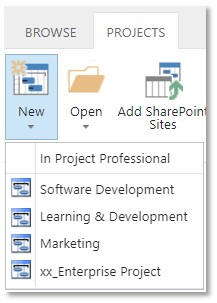
User belongs to the Marketing Department

User does not belong to the Marketing Department
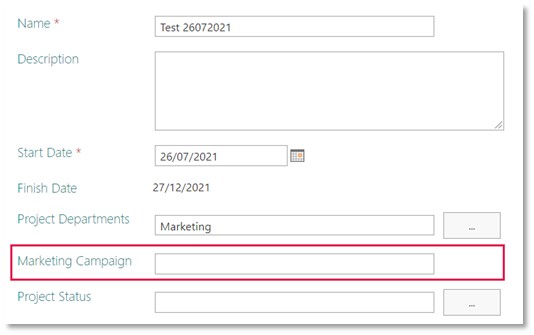
Another example is the visibility of Enterprise Custom Fields (ECFs). ECFs that have a department associated with them will only be visible for projects associated with that same department.
Using the example below, the ‘Marketing Campaign’ field is only required for Marketing Projects. The user will only be prompted to complete this field if they associate the project with the Marketing Department.

As stated above, the Departmental feature cannot be used to grant permissions or restrict access to certain projects. Where this is a requirement, you should make use of Security Groups and Categories or the Resource Breakdown Structure (RBS) – a hierarchical security structure.
Next Steps
If you would like to find out more then please get in touch to speak with one of our Consultants today.