IMPORTANT UPDATE: Microsoft Project Online Retirement scheduled for September 30, 2026. From this date Project Online will no longer be accessible, however we can help you transition to Planner Premium and the Wellingtone Accelerator+ or to Project Server Subscription Edition.
How do you allow management of a project to be shared between more than one user in Microsoft Project Online?
Project Online has been designed so that Project Owners of projects manage the schedule and project detail pages throughout the lifecycle of the project. By default, only the Project Owner has full control, i.e. read/write access, to the project. However, we have come across certain scenarios where responsibility for managing the project is shared between more than one user.
For example, responsibility for maintaining the project schedule is delegated to a dedicated Project Planner who reports to the Project Manager. In those scenarios, one of the options available is to use ‘Project Permissions’ to elevate permissions for specific users and provide additional users with access to ‘manage’ the Project.
Below are the permission levels available through the ‘Project Permissions’ functionality.


Although this would give the additional project manager role almost all of the access required to manage the project, some additional functionalities such as ‘Build Team from Enterprise’ and the ability to manage the ‘Project Permissions’ are not enabled.
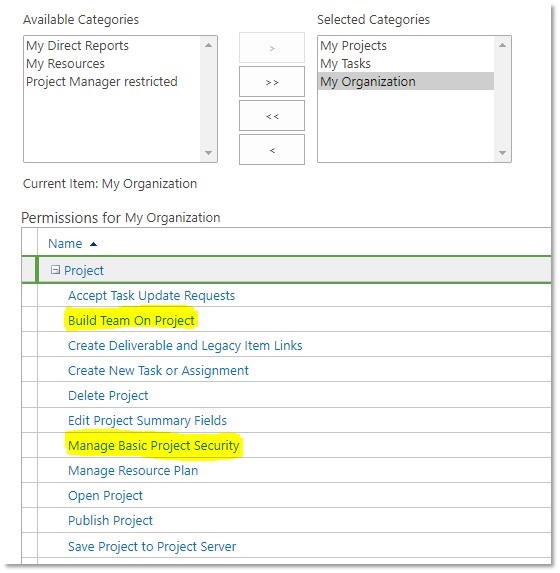
These additional permissions are provisioned through the Security Group. Access to the ‘Build Team from Enterprise’ and ‘Project Permissions’ functionalities are provided through ‘Build Team on Project’ and ‘Manage Basic Project Security’ respectively.
Each of the Project Security Groups, Project Managers, Team Members etc, are allocated the required permissions to PWA and Projects alike through Security Categories – My Organization, My Projects and My Tasks. By default, the ‘Project Managers’ security group is assigned the relevant access through the ‘My Projects’ category. The additional users provided with elevated permissions through the Project Permissions functionality (outlined above) are unable to access ‘Build Team from Enterprise’ and ‘Project Permissions’ because they are not the owners of the project. Only Project Owners have access to these permissions settings as they are assigned under the ‘My Projects’ category.
In this scenario, the ‘Project Managers’ group will need the two permission levels mentioned (‘Build Team on Project’ and ‘Manage Basic Project Security’) to be enabled for the ‘My Organization’ category.
If you would like to receive some further support on this topic, please contact Wellingtone Support for more information.